
Watch how it works
How to convert TXT to Word
Watch how to turn a plain text file into a formatted Word document with the Asli Tools TXT to Word converter.
TXT to Word Converter — Convert .txt to DOCX Online
Turn plain text files into editable Word documents. Upload a .txt file, choose DOCX or DOC, and download in seconds. Free, no signup, and processed entirely in your browser.
This converter turns a plain text (.txt) file into a Microsoft Word document you can open and edit in Word, Google Docs, or LibreOffice. Everything runs in your browser, so your file is never uploaded to a server.
What is TXT to Word conversion?
A .txt file stores only raw characters — no headings, bold, tables, or page layout. A Word document (DOCX or DOC) adds that structure. Converting TXT to Word places your text into a proper document with paragraphs and styles, giving you a file that is ready to format, edit, and share.
Why use this converter
Conversion happens locally in your browser, so your text stays on your device and nothing is uploaded. There is no account to create and no software to install, the output has no watermark, and you can optionally let the tool detect headings, lists, and tables so you start from a structured document instead of one long block of text.
How to convert TXT to Word
The whole process takes well under a minute:
Upload your file
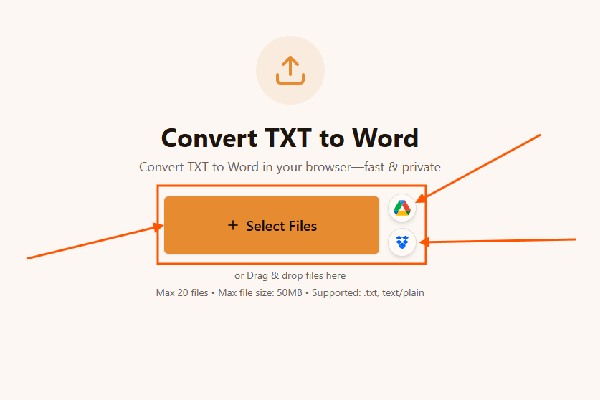
Upload your file to the TXT to Word converter. Drag and drop a .txt file onto the page or click to browse. If your text uses a non-standard encoding, pick the matching option (UTF-8 works for most files).
Adjust the output
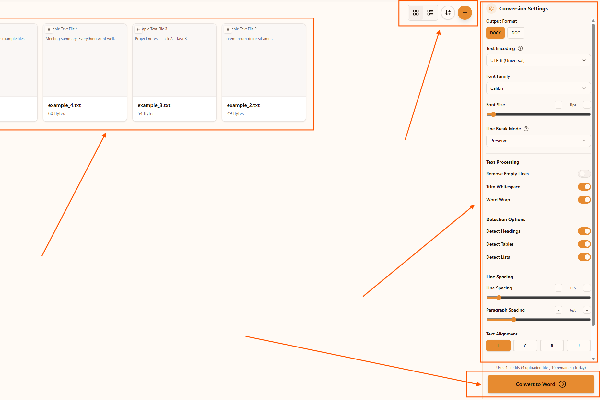
Adjust the output in the TXT to Word converter. Choose DOCX (recommended) or DOC, set the font, spacing, and alignment, and turn on heading, list, or table detection if your text contains that structure.
Convert and download
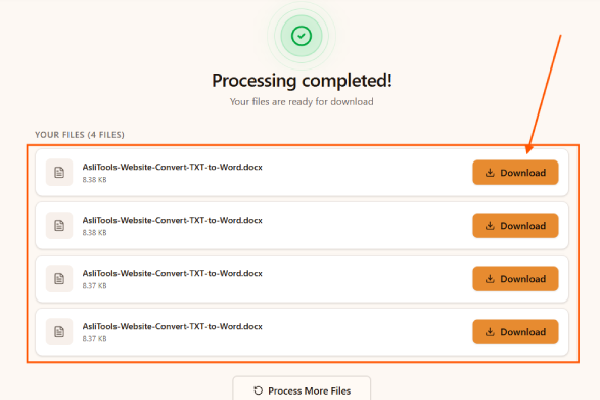
Convert and download with the TXT to Word converter. Click Convert to Word and your document is generated in the browser, ready to download and open in any word processor.
What the converter can do
Beyond a basic text-to-document conversion, you can control how the finished Word file is built:
- DOCX or DOC output — DOCX for modern Word and broad compatibility, or DOC when you need to support very old versions of Word.
- Typography control — set the font family, size, line spacing, paragraph spacing, and text alignment before converting.
- Heading detection — Markdown-style headings (#), all-caps lines, and short standalone lines can be turned into real Word headings.
- Table recognition — tab-separated, pipe-separated, or column-aligned text can be rebuilt as Word tables.
- List formatting — bulleted and numbered lines are converted to proper Word list items.
- Encoding support — read files saved as UTF-8, UTF-16, ASCII, or Latin-1 so special and international characters survive the conversion.
- Text clean-up — optionally remove empty lines, trim trailing whitespace, and normalize line breaks for a tidier document.
- Batch conversion — convert several .txt files in one go and download them individually or together.
When this is useful
Common situations where converting TXT to Word saves time:
- Turning notes drafted in Notepad or another plain-text editor into a document you can format and submit.
- Making data exports, logs, or reports that arrive as .txt readable and editable in Word.
- Rebuilding tab- or column-separated text as a Word table without retyping it.
- Polishing a plain-text draft with headings and styles before sharing or printing.
- Preparing documentation written in plain text for colleagues who work in Word.
- Converting a batch of text files at once instead of opening and re-saving each one by hand.
Why not just rename the file to .docx?
Renaming a .txt file to .docx does not change what is inside it — the data is still plain text, and Word will either show errors or garbled content when it tries to read it as a document. A real conversion re-encodes your text into the DOCX structure (paragraphs, runs, and styles), which is what makes the result genuinely editable and compatible.
Tips for the best result
A few settings make a noticeable difference:
- Choose DOCX unless you specifically need to open the file in Word 97–2003.
- Enable heading detection when your text uses # headings, all-caps titles, or short section lines.
- Turn on table detection if your file has tab- or column-separated data.
- Select UTF-8 encoding for files with accented or non-English characters.
- Use the clean-up options to remove empty lines and trailing spaces for a tidier document.
Convert TXT to Word on Asli Tools
Upload your .txt file, pick DOCX or DOC, and download an editable Word document in seconds — free, private, and without installing anything.
Frequently asked questions
Have more questions? Don't hesitate to email us:
Is the TXT to Word converter really free?
Yes. The converter is free with no signup, no watermark, and no usage limits. Conversion runs in your browser, so there are no server or API costs behind it.
What TXT files are supported?
Any standard plain-text file with a .txt extension or text/plain type. You can read files saved as UTF-8, UTF-16, ASCII, or Latin-1, and the output is a Word document (DOCX or DOC).
Can it detect headings and tables automatically?
Yes. Heading detection recognizes Markdown-style headings (#), all-caps lines, and short standalone lines, while table detection rebuilds tab-, pipe-, or column-separated text as Word tables. Both are optional toggles.
Will the Word file keep my formatting choices?
The settings you pick before converting — font, size, line and paragraph spacing, and alignment — are applied to the document, and detected headings, lists, and tables are formatted with Word styles.
What should I do if a conversion fails?
Try a smaller file, switch browsers, or re-save the source file from the original app (selecting UTF-8 encoding). Very large files can also be split before converting.
Are my files private?
Yes. Files are processed entirely on your device and are never uploaded to a server, so sensitive text never leaves your computer.
Can I convert multiple TXT files at once?
Yes. Upload several files, set your options once, and convert them in a single batch. You can download each result individually or all of them together.
What is the difference between DOCX and DOC?
DOCX is the modern, XML-based Word format (Word 2007 and later) — smaller and more reliable. DOC is the older Word 97–2003 format. Choose DOCX unless you must support very old software.
Do I need Microsoft Word to open the result?
No. DOCX and DOC files open in Microsoft Word, the free web version of Word, Google Docs, LibreOffice, and Apple Pages.
Do I need to install anything or create an account?
No. The tool runs in any modern browser with nothing to install and no account required — just upload, convert, and download.


